
Multi-currency expense tracker · iPhone and web
Paid in three currencies. Added up in one.
For people who live, work or travel across currencies. Moongen records every expense in the currency you paid and shows your month in the one you think in. No bank login.


Scan to get it on your iPhone
Free during beta · No Android app yet — the web app works on any phone.
Free plan: up to 3 currencies and 3 wallets. More with Pro, coming soon.
Statement · September
Sample month · fixed sample rates
| Date | Item | Paid | In USD |
|---|---|---|---|
| 01 Sep | Rent01 Sep · PLN account | PLN 3,200.00 | USD 848.00 |
| 03 Sep | Design software03 Sep · Main card | USD 15.00 | USD 15.00 |
| 06 Sep | Groceries06 Sep · PLN account | PLN 212.40 | USD 56.29 |
| 12 Sep | Flight to Valencia12 Sep · Euro card | EUR 128.00 | USD 144.63 |
| 18 Sep | Coffee18 Sep · PLN account | PLN 14.00 | USD 3.71 |
| Spent this month | USD 1,067.63 | ||
Same idea in the app.
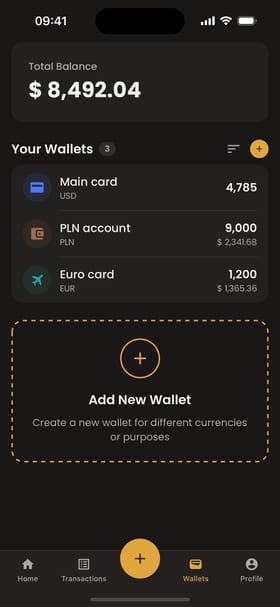
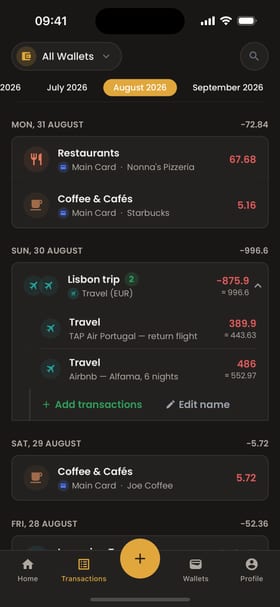
In the app: each wallet keeps its own currency; the total is shown in yours. Three wallets, three currencies — what the free plan includes.
01 — Where your month happens
Your month runs through more than one account.
Where it happens
What Moongen does
A card in dollars, cash in złoty, a trip in euros.
Each expense stays in its own currency. Your total is in one.
Cash in your pocket, coins in an exchange.
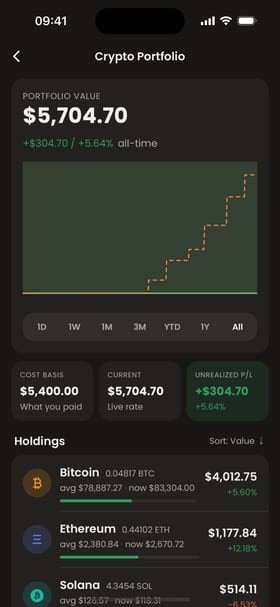
Add a cash wallet, and track crypto holdings next to your cards.
Dinner for five lines, paid in one charge.
Scan the receipt. Moongen saves it as a draft with its line items; it joins your transactions only after you review it.
02 — Follow one receipt
Paid in euros. Counted in your currency.
You type an expense or scan the receipt. Here is one, all the way through.
01 · Scan and review
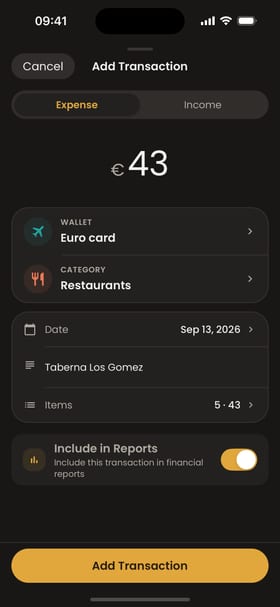
Photograph the receipt. A third-party text-recognition service reads the merchant, total and items. Moongen saves a draft; you review it — €43, 5 items, Euro card — and add it.
Free plan: 20 scans a month.
02 · In your month
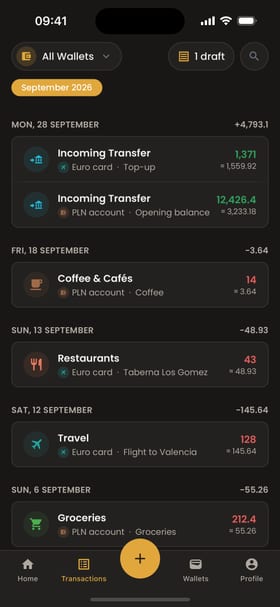
It joins the rest of September in the wallet's own currency. EUR 43.00 stays EUR 43.00.
03 · In your currency
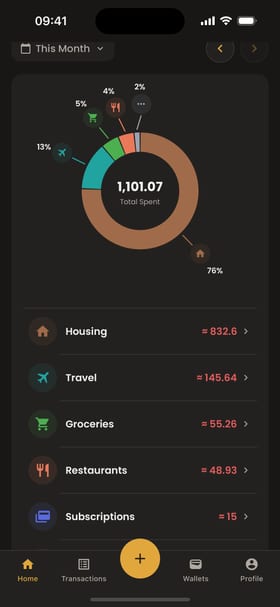
Your month adds up in the currency you think in: 1,101.07 USD spent, at live rates. (The ledger above uses fixed sample rates.)
No receipt? Tap +, enter the amount and pick the wallet. Paid from another wallet? Record a transfer between them, even across currencies.
03 — The app, as it is
The app, as it is.
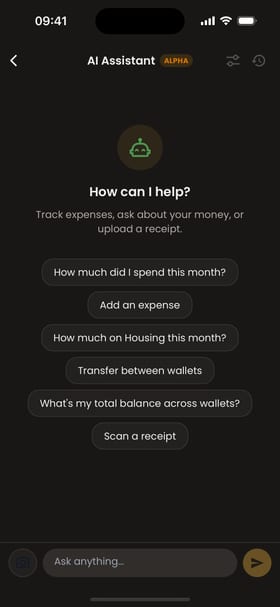
Real screens from the current app. No mock-ups.
04 — Privacy
What Moongen asks for, and what it never asks for.
Asks for
- An email, or nothing at all — guest mode works without an account.
- The expenses you choose to record.
- A photo of a receipt, when you scan one — sent to a third-party text-recognition service to read it.
Never asks for
- Your bank login.
- Your card numbers.
- Access to your bank account.
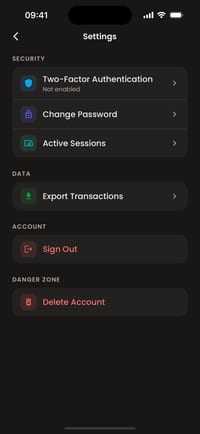
Face ID lock
Two-factor sign-in (authenticator app)
See and end active sessions
Delete your account from settings
05 — Pricing
Free while in beta. Here is exactly what that includes.
- Wallets
- 3
- Currencies
- 3
- Transactions per month
- 150
- Budgets
- 1
- Receipt scans per month
- 20
- Assistant questions per hour
- 30
- History you can see
- Last 3 months
- Crypto holdings tracking
- Included
| Free (now) | |
|---|---|
| Wallets | 3 |
| Currencies | 3 |
| Transactions per month | 150 |
| Budgets | 1 |
| Receipt scans per month | 20 |
| Assistant questions per hour | 30 |
| History you can see | Last 3 months |
| Crypto holdings tracking | Included |
No ads. No card required to start.
Pro (coming soon)
Limits and price announced before launch.
What early users say
06 — FAQ
Before you download.
Is it free?
Yes, during beta. The free plan has limits, listed above. A Pro plan is coming; its limits and price will be announced before it launches.
Do I have to connect my bank?
No. Moongen never asks for a bank login. You record expenses yourself or scan receipts.
Which currencies can I use?
Each wallet has its own currency, including crypto holdings such as BTC and ETH. Your totals are shown in one base currency you choose. The free plan covers up to 3 currencies.
Which exchange rate does it use?
Moongen converts with current market rates from public rate providers; the rates on this page are fixed samples for the demo.
Can I try it without an account?
Yes. Choose guest mode in the app or the web app. You can create an account later.
Is there an Android app?
Not yet. On Android, use the web app in your browser.
What does the assistant see?
The Moongen data it needs to answer — on the free plan, your last 3 months. Questions and scanned receipts are processed on Moongen's servers with third-party AI and text-recognition services. It can draft a transaction for you to confirm.
Can I delete my data?
Yes. You can delete your account from Settings.
07 — Get the app

Record it in the currency you paid. Read it in yours.
Free during beta · No Android app yet — the web app works on any phone.
Scan to get it on your iPhone
Requires iOS 16.4 or later · iPhone and iPad
No bank login · Face ID lock · Two-factor sign-in · Delete your account any time